|
<< Click to Display Table of Contents >> BDE language driver samples |
  
|
|
<< Click to Display Table of Contents >> BDE language driver samples |
|
All Paradox sample table views below is the same character code table applied various language drivers or viewed under various system character drivers.
Many or at least some modern databases use Unicode characters for text presentation avoiding the problems with wrong presentation of characters used in regional languages.
As BDE has not been updated since 2001 and never will, tables depending on BDE support will never be unicode compliant (UTF-8 or Unicode) and will thus continue to depend on character interpretation based on various code pages for the 224 character extended ASCII character set (char codes 32-255).
The only character data able to keep correct character presentation independent of the language driver is data stored as RTF in either FormattedMemo or RTF in plain Memo fields.
So, to meet the needs of various letterings adaptive to various languages even when only using the common simple 224 characters range, the data tables are each linked to language and character set drivers enabling regional character interpretation of the same numerical character codes within the extended ASCII character set.
This means a Paradox or dBASE table can be ported from one user to another without losing the proper character settings for column headers and table string data contents as the language driver setting is embedded in each .db and .dbf data table.
As character sets used with tables being ported may get wrong during export or import between various database systems you may need to adjust the character selection used with specific tables - e.g. receiving a Paradox table exported form a MS Access database.
Changing the language driver of a table changes no data at all, it only changes the character read out of each stored numerical character codes.
Changing the language driver for the currently displayed table is done via the table menu.
From the Help menu you can see a large number of available driver codes.
See also Change language driver.
See also the Character codes external link.
As the BDE does not support unicode, displaying other characters than those supported by the default non-unicode characters of your current system depends on adapting the Windows system settings for non-unicode applications as displayed in the PdxEditor Help | About dialog (IBM/OEM CodePage).
Usually the default Windows character set is accompanied by a certain default DOS character set - e.g. cp1252 with cp850, cp1251 with cp866, etc.
This however can be changed in the system settings as needed (but usually not recommended!).
The BDE table character display depends on these setting, however pseudo graphical box draw characters will not display even when applying the e.g. cp437 for Windows non-unicode applications.
Displaying a BDE table with the ASCII driver all pseudo graphical characters are unavailable displayed with the # substitution symbol as are the historic Pesetas Pts (₧ - #158), the little used Reversed Not sign (⌐ - #169) as well as most of the Greek characters and math characters.
On a modern computer (with e.g. Windows 7, 8 or 10 and Western system settings) displaying a BDE table all characters of the CodePage 1252 set are displayed using e.g. either of the Windows language drivers DBWINUS0, DBWINES0 or DBWINWE0.
With the INTL850 driver all characters of the CodePage 850 are displayed except the pseudo graphical box draw and hatching characters used with old DOS systems.
In some settings some characters may be displayed by a related substitute character as e.g. in CodePage 850 the lowercase dotless i char (ı - #213, used in e.g. Turkish, Tatar and Azerbaijani) replaced in BDE by a standard i (system setting cp1252/cp850).
Concerning the DBWINWE0 it actually does not specify the Windows Western 1252 character set but rather just the current Windows character set - thus displaying a BDE table with the DBWINWE0 driver on a computer using the cp1251/cp866 Cyrillic character set will not display the extended characters as of CodePage 1252 but rather the Cyrillic characters of CodePage 1251.
Also, same table on a system using cp1252/cp866 (unusual setting!) surprisingly will display a complete Cyrillic character set like CP1251 (see below).
So, though the DBWINWE0 language driver is intended for displaying Western Windows codepage characters, on an Eastern system, the same data table will prove you wrong, if you consider DBWINWE0 to be unicode.
Displaying other characters, e.g. Cyrillic in the range 128 - 255 applying the ancyrr driver, will thus depend on the system settings for non-unicode/DOS applications, e.g. CodePage 866 for Cyrillic, and not the current Windows codepage!
Box draw characters are not displayed in Paradox/dBASE data grids, whatever language driver applied.
BDE table (Paradox) viewed with applied ASCII language driver and system setting CodePage 1252 with CP437 for non-unicode applications:

BDE table (Paradox) viewed with applied INTL850 language driver and system setting CodePage 1252 with CP850 for non-unicode applications:

BDE table (Paradox) viewed with applied DBWINWE0 language driver and system setting CodePage 1252 with CP850 for non-unicode applications:

BDE table (Paradox) viewed with applied DBWINWE0 language driver and system setting CodePage 1252 with CP866 for non-unicode applications:
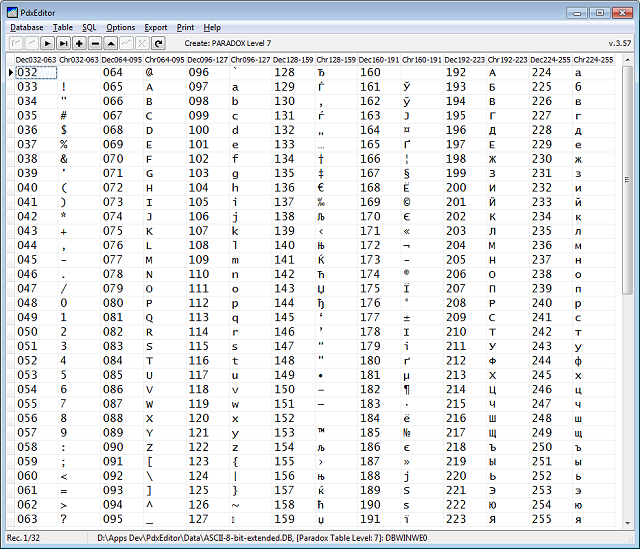
BDE table (Paradox) viewed with applied cyrr language driver and system setting CodePage 1252 with CP866 for non-unicode applications:

BDE table (Paradox) viewed with applied ancyrr language driver and system setting CodePage 1252 with CP866 for non-unicode applications:

For comparison the following examples show the same character code set from a non-encoded text file opened in a text editor with seven different code pages: 437 (US), 850 (international Western), 858 (as 850 but with €), 1252 (Windows Western), 866 (Cyrillic), 855 (Cyrillic) and 1251 (Windows Cyrillic).
The 437 and 866 representing early DOS CodePages reading a number of character codes as box draw characters.
Text file as viewed with code page 437:

Text file as viewed with code page 850:

Text file as viewed with code page 858 (introduced by Microsoft 1998, equivalent to CP 850 except #213):

Text file as viewed with code page 1252:

Text file as viewed with code page 866 (Cyrillic):

Text file as viewed with code page 855 (Cyrillic):

Text file as viewed with code page 1251 (Cyrillic):
