|
<< Click to Display Table of Contents >> BDE Driver settings |
  
|
|
<< Click to Display Table of Contents >> BDE Driver settings |
|
From Windows 6/7 and later, the BDE Administrator always must use the setting Run as administrator.
You may find the file at C:\Program Files (x86)\Common Files\Borland Shared\BDE\
where you may have to access the file's Properties, Compatibility to do the setting.
By default the BDE Administrator stores the configuration file (usually IDAPI32.cfg) in the C:\Program Files directory.
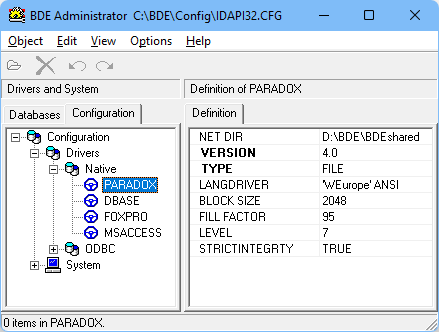
BDE Admin Windows 11 screen print
However, since Windows Vista/Windows 7 the Windows operating system will not allow applications storing data in the "C:\Program Files" nor in the C:\ root directory, some other directory is to be selected of your preference, e.g. in D:\BDE\Config.
This change should be made whatever BDE dependent application is used.
See also BDE and Windows Registry
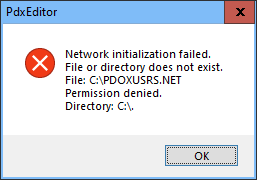
If you see this error message launching the PdxEditor or some other Paradox application, the default NET DIR address hasn't been changed from the original default C:\ address (disallowed from Windows Vista and onwards).
But, as PdxEditor has it's own Paradox NetFile management, PdxEditor still works in spite of this BDE error message.
However, to dismount this annoying message, do change this address pointer via the BDE Administrator, and this issue is solved (see below).
The BDE Paradox level 3 corresponds the Paradox table level 3.5, earlier versions not supported.
The BDE dBASE level 3 is actually for the dBASE III+ (= dBASE III Plus) level tables, as the dBASE III format is not compatible with the later dBASE III+ format and level III is not handled by the BDE.
The BDE FoxPro level 25 corresponds the FoxPro table level 2.5.
The BDE general language driver setting is only relevant when creating new tables.
You are recommended to select some of the more modern drivers suiting the language of preference - e.g. the 'ascii' ANSI driver or some other ANSI driver and not the older DOS-based Paradox or dBASE drivers.
Some of the default BDE settings prioritise space savings on older systems and may benefit from some more contemporary settings.
Some will suggest setting the Paradox BLOCK SIZE somewhat larger than the default, e.g. selecting 4096 (or 16384, but not the topmost 32768 that may cause some memory errors).
Also, it may be suggested setting the Configuration\System\INIT values as SHAREDMEMSIZE 8192 and SHAREDMEMLOCATION 0x3BDE.
Further, every session accessing a paradox database or individual paradox tables needs a specified location for the paradox locking file, the paradox NET-file (PDOXUSRS.NET) keeping track of and preventing access conflicts in case of multiple application sessions accessing the same table.
If the application(s) do not specify a location (NET DIR) for the NET-file, the default NET-file directory will be used as specified by the configuration file accessible by the BDE Administrator.
As the NET-file location by the BDE Installer by default has been set to the C root directory (C:\) this has prevented many older BDE dependent applications to run on later versions of Windows.
This however, can be solved in either of two ways:
• The applications by design could be made independent of the default shared NET DIR location, and rather point to it's own per session location - preferentially the current database directory or some in app manually selected NET DIR.
Applications using this method will not depend on the default NET DIR location.
The PdxEditor uses this technique and thus does not depend on the NET DIR configuration location.
• As many older custom application designs as well as older versions of the Paradox application (e.g. Borland Paradox 7 and Corel Paradox 8) do not use the option to define it's own per session NET DIR location, and rather depend on a common shared NET DIR location. With later versions of Windows this may prevent them from running, if the NET DIR points to the default C root directory. A general solution to this is changing the general settings via the BDE Administrator setting the NET DIR address to some location off the C root and Program Files directories and selecting e.g. D:\BDE\PdxNetDir as illustrated, or some other directory of your preference.
This will bring life to even older custom applications not being supported any more by the vendor/developer and thus not accessible for the proper update of software code.
Though the BDE Administrator is the core application for setting the BDE parameters, some of the parameters are more quickly adapted with the BDE Configurator available from the same site as the PdxEditor.
Whenever accessing data on a network drive, where more applications from distinct computers or multiple session of the same application may access the same data, it is essential to point to the same NET-file directory visible by all accessing computers to ensure smooth multi-user access only locking on a record level by each user.
In this case it is recommended pointing to the same directory as the active database directory.
See also BDE and Windows 11.
__________________________