SQL Crosstabs with Paradox
How to obtain a crosstab output with Paradox with Local SQL
... using a few simple SQL tricks.
Paradox and Borland Database Engine (BDE) really does't support crosstab queries nor the SQL functionalities usually needed for creating crosstabs.
As Paradox does not support CASE conditions nor subqueries as arguments
for the FROM predicate nor correlated subqueries for the SELECT predicate, crosstabs have to rely on the Local SQL ability of in-statement referencing disk stored SQL statements as equivalent of subqueries or VIEWs.
The crosstab solution is to build and add the aggregated columns step by step using JOINs on these intermediate data generating stored SQL statements.
The SQL has been tested valid with Delphi Paradox SQL compliant solutions (e.g. PdxEditor) using BDE 5.2.0.2 as the database middleware.
If you regularly query the same paradox database to get an updated crosstab query, though slightly complex, it may pay creating the number of partial interlinked queries conveniently giving dynamic access to repeated crosstab results.
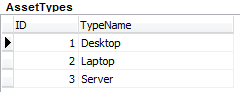
Consider having a computer leasing business with an Assets list linked with two key-lists for decoding the TypeName (table: AssetTypes) and the StatusName (table: AssetStatus).
Sample: Download and unpack Assets-SQL.zip into an \sql subfolder to the database directory of choice, and it's all there to go:
• First load and run the AssetsCREATE.sql (do use the PdxEditor [SQL script] tab to run this SQL batch script).
• Then load and run the AssetsXTabFinal.sql - and you'll have the crosstab displayed.
The tables
 |
 |
 |
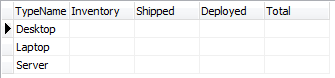
The desired crosstab / pivot table
And we would like to create a crosstab like this:
How to get there ...
To get through to the final crosstab presentation a series of SQL statements have to be created and disk stored to be accessible by the final crosstab generating query. None of the intermediate data are disk stored - only the SQL-statements (i.e.: *.sql text files).
The statements are stored in e.g. a subfolder \SQL relative to the database directory. This location is used by the column generating and final SQL statements.
Each of the queries below are stored as individual "VIEW" sql text files and named as given in their comment header.
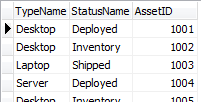
First we will generate a de-coded Assets list for simpler access for the successive queries:
/* This is the AssetsDecoded.sql extracting Assets decoded for TypeName and Status */ |
transcribing the Assets list to this:
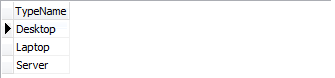
Next, we will create the left hand category column, and to ensure independence of possible empty groups in the Assets list, the grouping is based on every possible values from the TypeName list (AssetTypes):
/* This is the AssetsXTab0.sql generating the left hand categories */ |
which will generate this:
The flowing SQL statements will generate each of the value columns for the resulting crosstab:
/* This is the AssetsXTabA.sql generating the Inventory aggregate column */ |
/* This is the AssetsXTabB.sql generating the Shipped aggregate column */ |
/* This is the AssetsXTabC.sql generating the Deployed aggregate column */ |
/* This is the AssetsXTabDTotal.sql generating the Totals aggregate column */ |
And to run the final crosstab query just execute this:
/* This is AssetsXTabFinal.sql calling all other SQLs and generating final crosstab */ |
and you will get e.g. this:
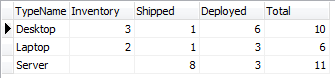
All screen prints are from the PdxEditor application used with the codes of this example.
The SQL code easily adapts to quantitative values like SUM as well as statistics as MIN, MAX, AVG just changing the COUNT function as desired in the four value column SQL statements.
So, though a little laborious for ad hoc crosstabs, if you do need to regularly query some dynamic Paradox data and don't mind about the 'missing' zeros for the all-NULL value counts, this may be a solution.