SQL Crosstab created by generic SQL code
How to obtain a crosstab output in a DBMS without a crosstab or pivot table function
Some DBMS do have specific cross-tab or pivot-table features which are however often very specific to the individual DBMS and thus not transparantly transferrable from one system to another.
Testings and tuning of common SQL code as presented below has it's inspiration from a thread at stackoverflow some years ago.
The solutions presented here uses generic SQL code and will thus be transferrable also between leading database systems.
The code (Example 1 & Example 2) have been tested valid with SQL Server (v.2017), MySQL (v.8), PostgreSQL (v.9.6), Firebird (5.0.3), SQLite (3.45), Absolute Database (v.7), SQLMemTable (v.12).
Example 1
Applicable to SQL Server, MySQL, PostgreSQL, Firebird, Absolute Database, SQLMemTable and others.
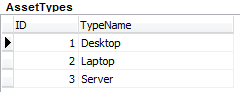
Running a small computer leasing company the Assets list at an early modest start up may look like this with corresponding Types and Status coding:
 |
 |
 |
and we would like to create a crosstab like this:
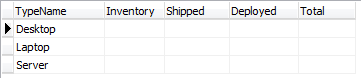
In essence it's about transforming the Assets list into
this, MySQL (partial view) |
or this, Absolute Database (partial view)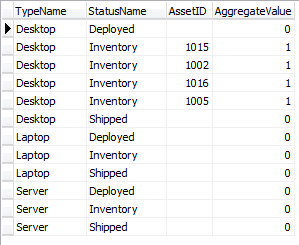 |
(the views depending on the specific database application displaying empty values as [NULL] or blanks),
and then crosstabbing the first, second and fourth column.
The SQL code to create a crosstab / pivot table:
SELECT |
The reason why an aggregation (in this case) being basically a COUNT of instances can be done using a SUM function in the outer query is the casting in the middle query of instances into ones (integer values of 1) enabling equaling then count of instances when summing the 1-values.
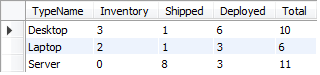
Further, the mapping to zero (0) of zero instances for the individual grouping (Desktop-Deployed; Desktop-Inventory; etc.) and the LEFT JOIN in the middle query will prevent displaying "NULL" for zero counts and ensures also showing the otherwise empty Laptop and Server rows:
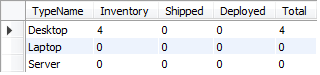
Without the zero mapping and the LEFT join it would have looked like this and not showing the (at the modest start up) empty Laptop and Server rows:
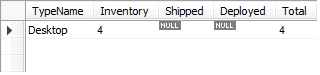
and from the populated Assets list:
InterBase (not compatible!)
Even though the nested subqueries are both simple (non-correlated) queries, InterBase does not respect the 1/0 "Boolean" CASE casting, and reports absence of asset states falsely with the number 1, and so also giving a wrong total across the asset states.
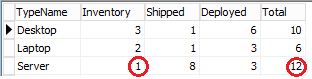
Interestingly InterBase's close cousin Firebird does not have this issue yilding exactly the same perfect result as the rest in this group (see above).
The InterBase test was done with Delphi 10.4.2 on a LocalHost connection.
SQL crosstab / pivot table on quantitative values:
True summing of quantitative values as e.g. values of something in some currency or tonnage of ships can be done with almost the same code just changing the non-NULL mapping in the middle query from values of ones to keeping the proper value as from this
CASE WHEN ast.AssetID IS NOT NULL THEN 1 ELSE 0 END AS "AggregateValue"
to e.g. this:
CASE WHEN ast.AssetValue IS NOT NULL THEN ast.AssetValue ELSE 0 END AS "AggregateValue"
If the SUM functions in the outer query is changed for some statistic function, the mapping of NULLs to zero must be avoided in favour of keeping the NULL values proper.
Example 2
Applicable to SQL Server, MySQL, PostgreSQL, SQLite, InterBase, Absolute Database, SQLMemTable and others.
If you do have a simpler single table non-coded list (in this case not coded for AssetType and AssetStatus)
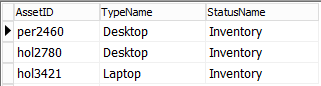
/* which (except for InterBase) may be generated from Assets like: */ /* or, depending on your database engine, like this: */
|
you may use the following simpler SQL crosstab code provided each possible value of the left hand group (e.g. TypeName) is present at least once in the otherwise empty list (left) vs. a filled list (right) as e.g.:
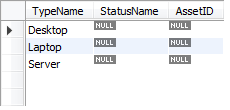
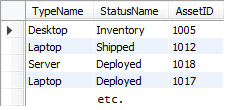
SELECT DISTINCT -- quoting the referred correlation names, this also works with PostgreSQL and InterBase |
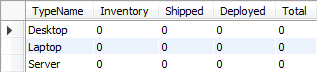
This way, even from an "empty" Assets list, you will get the following crosstab output including all left hand groups :
and from a more extensively populated Assets list:
To get a Paradox or dBase crosstab - see Paradox / BDE crosstab example using a series of JOIN'ed stored SQL statements.
This is because the SQL code above will NOT work (properly) with Paradox or dBase as the BDE / Local SQL does not correctly evaluate correlated subqueries as arguments of the SELECT predicate and all of them will evaluate to zero whatever the true data of the source table.