|
<< Click to Display Table of Contents >> Restructure Extended, dBase |
  
|
|
<< Click to Display Table of Contents >> Restructure Extended, dBase |
|
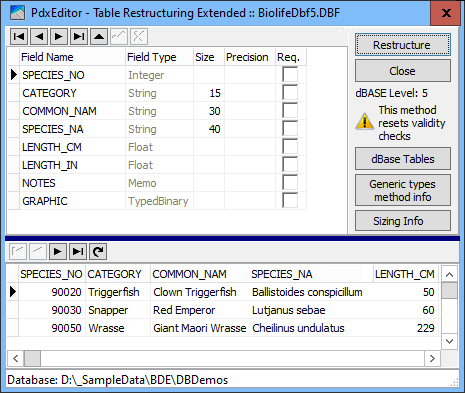
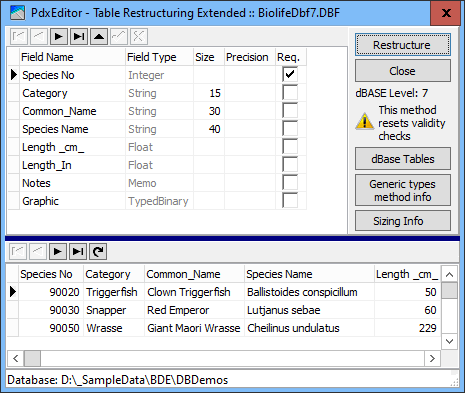
With dBASE tables, only the dBASE 7 tables support setting the Required attribute, making this extended method relevant only for dBASE 7 tables or dBASE tables intended to be propagated to dBASE level 7.
Also, as the procedure is mediated through specifying fields via the general generic data types, dBASE Numeric fields will propagate corresponding the cut offs between SmallInteger, Integer and Float types, thus not strictly reproducing the number of digits/decimals specified dBASE Numeric fields.
If not needing to set the Required attribute, you are recommended usual basic method of modifying field properties.
|
|
|
Though offering the extra Required attribute, the Extended method has some issues to take into account:
As this method of restructuring is based om recreating the table as a mirrored data copy, other existing validity checks as MinValue, MaxValue and DefaultValue, as well as Referential Integrity settings will be cleared!
See also Table Validity Checks.
Though clearing the Value Check conditions, the restructuring will preserve all indexes.
Using a different technology than the basic restructure dialog, rebuilding the table, if containing an Autoinc field, this will be re-initialized and reallocated with new sequential values.
Applying the Required field attribute to a dBASE table ("Required" not supported by dBASE III, IV and 5), the table will automatically be propagated into a dBASE level 7 table, the only dBASE level to support the Required attribute feature.
Correspondingly, lifting Required attributes on a table not having fields specific for dBASE 7 (Autoinc, Long, Double and DateTime) will return into a dBASE 4 or 5 table.
As this dBASE level 7 table may not be supported by other dBASE (or older Paradox) applications, be careful not to use this feature without ensuring the resulting compatibility.
The FoxPro 2.5 format does not support the Required attribute, so, applying the Required attribute to FoxPro table, it will be propagated into a dBASE level 7 table.
If for any reason the restructuring is not successful, the procedure is always creating a temporary backup file
{TableName}_TempXXXXXX.db(f), which you can access and rename into the original table name (after deleting that). The Temp file is auto-deleted when the procedure terminates normally.
The XX.. of the Temp-file representing a six digit hexadecimal random number in the range 0 to FFFFFFh (0 to 16.777.215).