|
<< Click to Display Table of Contents >> Memo/FmtMemo |
  
|
|
<< Click to Display Table of Contents >> Memo/FmtMemo |
|
Besides Paradox tables (from vers. 4) having the option of dedicated fields for RTF-Formatted Memos (FmtMemo) both dBASE all versions, FoxPro and Paradox from vers. 4 and later all provide the general Memo field type for long bodies of text accepting simple formatting as line breaks, indents and tabs.
The PdxEditor as a speciality may also handle RTF-formatted text in the simple Memo type fields, as the underlying RTF-text basically still is just plain text being formatted by use of special character sequences being decoded for the formatting purpose:
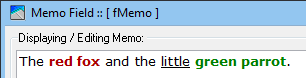
Rtf displayed with formatting (stored in standard Memo field, displayed with PdxEditor)

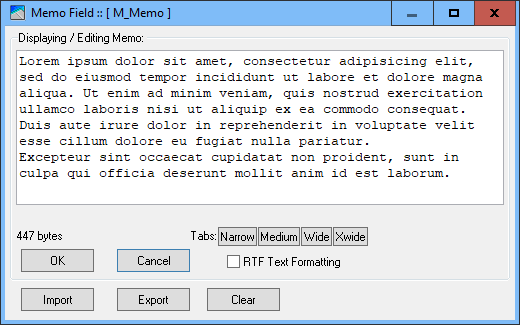
Rtf displayed as undecoded raw text
In PdxEditor the Memo viewing and editing window allows being used as a plain Memo editor or for RTF-editing of choice.
This allows RTF content also in dBASE and FoxPro tables otherwise having this capacity on a table level but depending on special design application forms for this purpose.
See also Unicode Memo/FmtMemo
Though both types basically just storing plain text, the FmtMemo may raise issues when exporting to other database systems (as e.g. dBASE) not properly understanding this specialized field type.
For this reason it may be a more versatile solution storing RTF data in plain Memo fields (as illustrated above), and then having the database application do the needed on-the-fly decoding for display.
Plain Memo fields usually imports/exports with most database systems without issues.
In the data grid the (plain) text of Memo fields displays the first 50 (can be changed) characters in the grid cell.
To distinguish Memo fields from plain text fields you may like to add a space character or some glyph character in front of the displayed Memo text - this can be specified in the INI file [Mode] DBGridMemoPrefix.

Fig.: The field Notes being of the Memo data type.
See Memo DBGird Display and Installation & INI-file.
Either of the Memo types are activated double clicking a Memo/FormattedMemo cell in the data grid, whatever empty or already being populated with text.
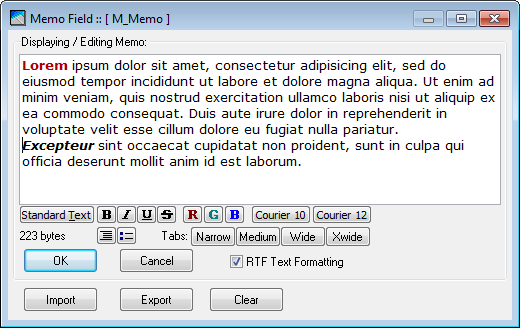
From these windows the individual body of text displayed by the window may be created, imported or exported as stand alone external text files, the RTF-files being im- and exported as such bearing the .RTF extension.
The Memo window using RTF formatting.
The same Memo window the RTF formatting being unchecked and the text being stripped from the underlying RTF coding.
The capability of editing and storing RTF-text in standard Memo fields is intended used only with dBASE tables not providing the dedicated FmtMemo type.
Besides enabling text formatting one of the benefits from RTF-coded text is the independence of high bit characters from the currently applied language driver - however still not compliant with multi byte unicode characters.
Although it is possible for all custom applications to program them to handle RTF coded text even if stored in a plain text field as the Memo type fields, standard database applications as Borland/Corel Paradox or the dBASE Plus do not handle RTF text in plain text (Memo) fields.
So, unless sure the receiving application does handle RTF text kept in standard Memo fields, either stay with plain text or for Paradox use the dedicated FmtMemo type fields for RTF-text.
Dedicated Formatted Memo fields are active only with Paradox 4, 5 and 7 tables and stores any text with applied RTF-coding.
Editing is similar to editing in the standard Memo field dialog with RTF selected.
In PdxEditor storing RTF text is limited to basic RTF not including embedded images/graphics or formatted tables.
__________________________