|
<< Click to Display Table of Contents >> BDE DLL path |
  
|
|
<< Click to Display Table of Contents >> BDE DLL path |
|
If the PdxEditor halts very early in it's launch before displaying the application window:
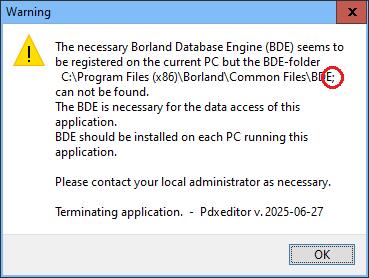
do first of all check that the stored DLL path of the BDE database engine is correct, as reports tell some users experiencing BDE installers inserting illegal trailing semicolon in the path registration, making the BDE engine non-functional.
On a PC running Windows 6 and later (Vista, 7, 8, 10, etc.) the Registry Key is store in the hive:
HKEY_LOCAL_MACHINE\SOFTWARE\WOW6432Node
Do run the Windows Registry.exe ([Windows]-R) and check the following Registry value:
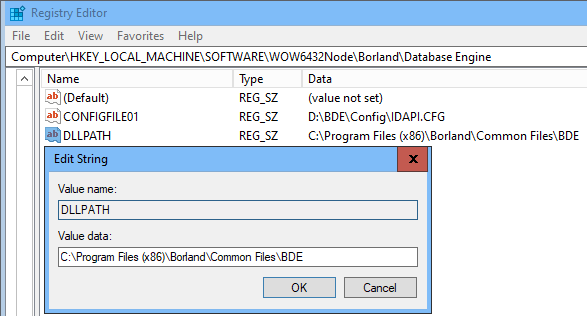
Correct path may vary according to chosen installation, and may for example also be like:
C:\Program Files (x86)\Common Files\Borland Shared\BDE