|
<< Click to Display Table of Contents >> Top panel and Status bar |
  
|
|
<< Click to Display Table of Contents >> Top panel and Status bar |
|
When selecting from the Database menu to open an Alias database, the application's top panel will open a drop down list with the currently available Alias databases.
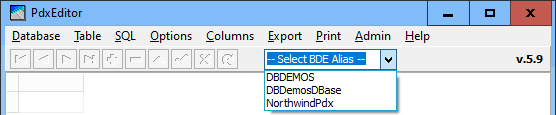
When database selection has been done the drop down list closes and the currently active data table create format is displayed, which will also determine the default suggested table format when selecting tables to open.
The SQL Create table type label in the top panel will at any time indicate the table type created by SQL or when saving a query result as a new table.
This Create table type will reflect the default table type from the alias database, or the preselected table type if working with a directory specified database. Ultimately it will automatically reflect the most recent selected table whatever from the alias database or from some off alias database directory.

If the current dataset is generated by an SQL query, the top panel displays a button [View SQL] enabling you to view the currently active SQL statement.

The status line at the bottom of the application window will show the position of the row selector and number of records of an active table or query.

In the middle section the status bar will reflect what kind of database is currently open, the active dataset and the table type & level (version):
•An Alias database connection will display the Alias name between square brackets.
•An Alias database + open table will display as Alias name between square brackets followed by the table name.
•A database as by directory will display as the database path between square brackets.
•A database as by directory + open table will display as the full table path without brackets.
•An active SQL query will display as the database (by Alias or directory) between square brackets followed by the word "SQL".
•When the active dataset is a table the table type and level as well as language driver is displayed.
•At the far right, the statusbar will display the FieldType of the currently focused column. The field type will be the generic type specified by the application, where ftSmallInt for a Paradox table will reflect the native field type Short, while for a dBASE table reflecting the native field type Numeric(4,0).
__________________________