|
<< Click to Display Table of Contents >> SQL dialog |
  
|
|
<< Click to Display Table of Contents >> SQL dialog |
|
This gives access to the whole palette of Local SQL querying and manipulation of the database.
The tables list to the right always reflects the current database, i.e. the currently active database directory.
The five tabbed SQL pages may all be used for active SQL execution, and the [Run SQL] is automatically linked to the front focused page.
The SQL storage page is intended for storing pieces of code to be used later and to pick from by copying.
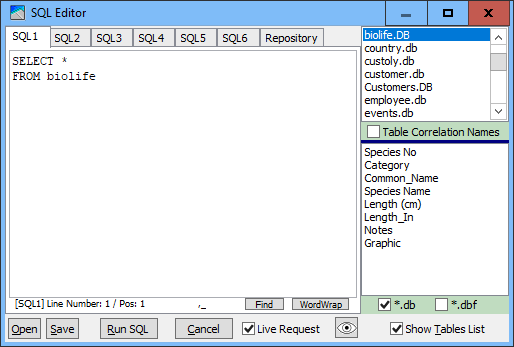
If Table Correlation Names is checked, inserting tables and field names by double clicking names from the lists will automatically be added correlation names according to the table's position on current the list, thus linking field names to specific tables.
Please refer to the SQL reference for information on correlation names.
All the SQL pages as well as the storage page are stored in the Windows Registry to be retrieved automatically next time you run the PdxEditor.
If the PdxEditor is located on a local computer, the automatic reloading of the SQL pages is linked to that computer.
If the PdxEditor is located on a network drive, the automatic reloading of the SQL pages is linked to your user profile provided the local system policy is using Windows rowing profiles.
If you plan to re-locate the PdxEditor to some other local computer or other network, you should save each SQL page to a disk file to bring the SQL collection with you.
The SQL statement of each page may be individually saved to or loaded from SQL disk files (.sql extension).
From the main window's SQL Statement Storage menu on the Options menu you may select where the default storage location is relative to the current database or to the application for saving and loading SQL statements.
Running a SQL statement as a Live Request means the query result will be Live editable provided the SQL is not a joined query and it has no calculated fields.
This way single tables can be queried live with fields displayed in any desired rearranged order.
Calling help on Local SQL is done with Ctrl-F1, whereas general Application help is called with the usual F1.
__________________________