|
<< Click to Display Table of Contents >> Grid to CSV or tabbed Text export |
  
|
|
<< Click to Display Table of Contents >> Grid to CSV or tabbed Text export |
|
Exporting data as text you have the options to chose among comma, semicolon and tabulator character as the field separator (delimiter) and for the comma or semicolon separated export files to accept or reject using quotes as string or text qualifiers.
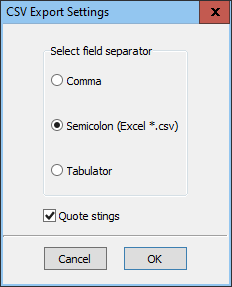
Exporting using either comma or semicolon as the delimiter or field separator adding (double) quote characters as text qualifiers around each field content is the default.
Deselecting the field quoting usually is dis-recommended as this may interfere with correct interpretation of the row structure on later import in case of empty fields or if the field data itself contains either of the comma, semicolon or quotation characters.
Export only without field quotings in case of specific needs from the receiving application.
To prevent risk of dysfunctions or misinterpretations of exported data some structure determining characters are converted to tags as indicated to avoid text acting as unintended active code if imported into HTML compliant data environments.
Character |
Character description |
Converts in export to |
" |
Double quote sign |
"" |
#13#10 |
Line break ANSI character value. |
<br> |
#10 |
Line break ANSI character value. |
<br> |
#13 |
Line break ANSI character value. |
<br> |
#9 |
Tab "character" ANSI character value |
<TAB> |
Optional text export character conversion |
||
< |
Lesser than |
< |
> |
Greater than |
> |
Conversion is of importance in order to enable inclusion of Memo and Formatted Memo fields with all their line breaks, tabs and punctuations without interfering with the field delimiting and all in one single text line of each record.
The optional conversion of the ampersand (&), the lesser than (<) and the greater than (>) characters ensures safe import into other databases without risks of inadvertently being interpreted as possibly risk prone tagged active HTML, XHTML or scripting code.
The tagging is compliant with standard HTML tagging and thus easily understood and converted to either HTML/XHTML or rich formatted text for whatever purpose being imported into some other database or to some other text media.
Though <TAB> is not a recognized HTML tag (HTML does not use tabs at all), the <TAB> is easily understood and may be converted to tabs for rich text formatting (RTF or alike) or to some other indenting in the target text of whatever format.
See also Schema File.
__________________________