|
<< Click to Display Table of Contents >> ClientDataSet XML Files |
  
|
|
<< Click to Display Table of Contents >> ClientDataSet XML Files |
|
Though XML data is by no means universally standardized, the ClinetDataSet/MyBase format is pretty simple to read.
A simple [Members] table like this:
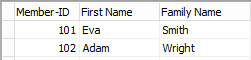
will look like this after XML export:
<?xml version="1.0" encoding="UTF-8" standalone="yes"?> <DATAPACKET Version="2.0"> <METADATA> <FIELDS> <FIELD attrname="Member-ID" fieldtype="i4"/> <FIELD fieldname="First Name" attrname="First_Name" fieldtype="string" WIDTH="15"/> <FIELD fieldname="Family Name" attrname="Family_Name" fieldtype="string" WIDTH="25"/> </FIELDS> <PARAMS/> </METADATA> <ROWDATA> <Row Member-ID="101" First_Name="Eva" Family_Name="Smith"/> <Row Member-ID="102" First_Name="Adam" Family_Name="Wright"/> </ROWDATA> </DATAPACKET> |
With XML-exported files, characters beyond the ASCII character set are UTF-8 encoded.
See also XML and MS Access.
See also importing ClientDataSet MyBase files