|
<< Click to Display Table of Contents >> Bytes fields |
  
|
|
<< Click to Display Table of Contents >> Bytes fields |
|
Bytes fields are mainly for special purposes implemented by specialized applications using Bytes fields for storing e.g. bar codes or GUID identifiers suitable for Bytes field storage.
Thus, Bytes has been implemented in the PdxEditor mainly just for viewing, that can be called by double clicking Bytes fields in the same way as calling BLOB data.
However, for test purposes, you may insert short character strings to test the hexadecimal Bytes array viewing feature.
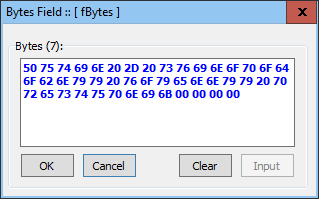
Bytes fields are included in delimited text import and export as well as Excel export with bytes as non-spaced string of hexadecimals.
To ease viewing from the Bytes dialog, the hex strings are displayed as spaced hexadecimals.
Inserting data into Bytes fields via SQL are executed by inserting the string without bytes convertion, as bytes convertion will take place when stored. Export will revert data into data as when added.
For the SQL statement
INSERT INTO TableName VALUES (1, 'some text', 'ABCDEF');
the text 'the Bytes source text' in a Bytes field sized as 8 Bytes will store as:
41 42 43 44 45 46 00 00
Warning: Be carefull when exporting/importing from CSV, as exporting any single byte above 7F (decimal 127) will be system language dependent and thus ambiguous when reimported!
This way, storing bytes with the Paradox Bytes fields may be generally disrecommended.
Note: This method inserting Bytes data via SQL may differ from methods used by other database systems.
Concerning GUID data, the Bytes field is not the best choice, as data added to Bytes fields are converted character by character into hexadecimals, thus scrambling the entered already hexadecimal coded GUID data.
A better solution may be to create a 36 or 38 character size text field to preserve the hexadecimal GUID data text representation as-is, entered like this including spaces or dashes:
987C6A75 B260 418D B27F 2D59EB5DA846
or like this:
987C6A75-B260-418D-B27F-2D59EB5DA846
or the 38 character presentation including braces:
{987C6A75-B260-418D-B27F-2D59EB5DA846}
__________________________