|
<< Click to Display Table of Contents >> The BDE Administrator window |
  
|
|
<< Click to Display Table of Contents >> The BDE Administrator window |
|
The BDE Administrator window displays information in two panes.
•The left pane is tabbed and displays a hierarchical tree of objects:
Databases page aliases of available databases.
Configuration page database drivers and BDE configuration settings.
•The right pane contains tabbed pages that display the contents of objects highlighted in the left pane. The tabbed pages in the right pane vary depending on the type of object highlighted in the left pane. For a list, see the Tabbed pages
A plus sign (+) beside an object in the left pane indicates that the object contains other objects below it. To see those objects, click the plus sign. When an object is expanded to show its child objects, the plus sign becomes a minus sign. To hide child objects, click the minus sign. For a list of other graphic symbols in the left pane, see Color-coded symbols
To view information about an object in the left pane, left-click the object. The right pane displays one or more tabbed pages of information about the object. For example, when a database alias is highlighted in the left pane, the right pane displays a Definition page that contains database Type, PATH, and DRIVER NAME parameters. Bolded parameters indicate a parameter that cannot be modified. All other parameters that appear in the right pane can be edited there.
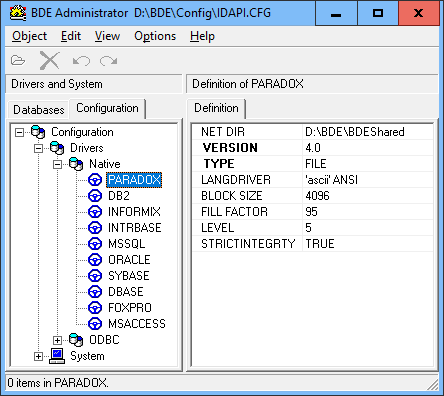
The BDE Administrator window (non-original illustration)